
Contacts
Customer enquiries don’t get lost in inboxes
Enquiries from Facebook and Instagram ad forms, from a form on your website, from your bio page and from comments land on one contact list — with a contact card, a “What’s next” hint and reminders.
Sample data from a test account
What you get
Contacts
All your potential customers in one place: forms, website, comments and import.
Contacts from Meta forms
Enquiries from ad forms are fetched automatically.
Website form
A ready contact form to embed on your website, plus CSV import.
Contact card and “What’s next”
Details, notes, reminders, meetings and history on one card. The card suggests the next step: a call, an email or a meeting.
Meetings and Google Meet, Zoom, Microsoft Teams
A meeting with a Google Meet, Zoom, Microsoft Teams link and a reminder, a call script, notes and the full contact history.
How it works
Connect sources → Guide the customer → Never miss an enquiry
Connect sources
Meta forms, a website form, your bio page, a webhook from another tool or CSV.
Guide the customer
Add notes, reminders and tasks, and change the stage in one click.
Never miss an enquiry
New contact notifications and meeting reminders.
From comment to customer
“How much is it?” under a post is a contact too
The AI agent spots purchase intent in comments and suggests creating a contact. The decision is always yours.
- “Create contact” next to a comment
- GDPR-compliant personal data: export and delete
- Permissions: who can view and who can manage contacts
Sample data from a test account
Sales assistant
Ready for every call
“Prepare me for the call” — AI reads the customer’s company website, the contact history and your services, then gives you goals, qualifying questions, arguments and answers to objections. The brief can prepare itself an hour before the meeting.
- A notification when the customer opens your offer — with the number of opens
- A “Needs attention” list: contacts with no activity and offers with no reply
- A new contact from a voice note — in the app or in a messenger (Telegram, WhatsApp)
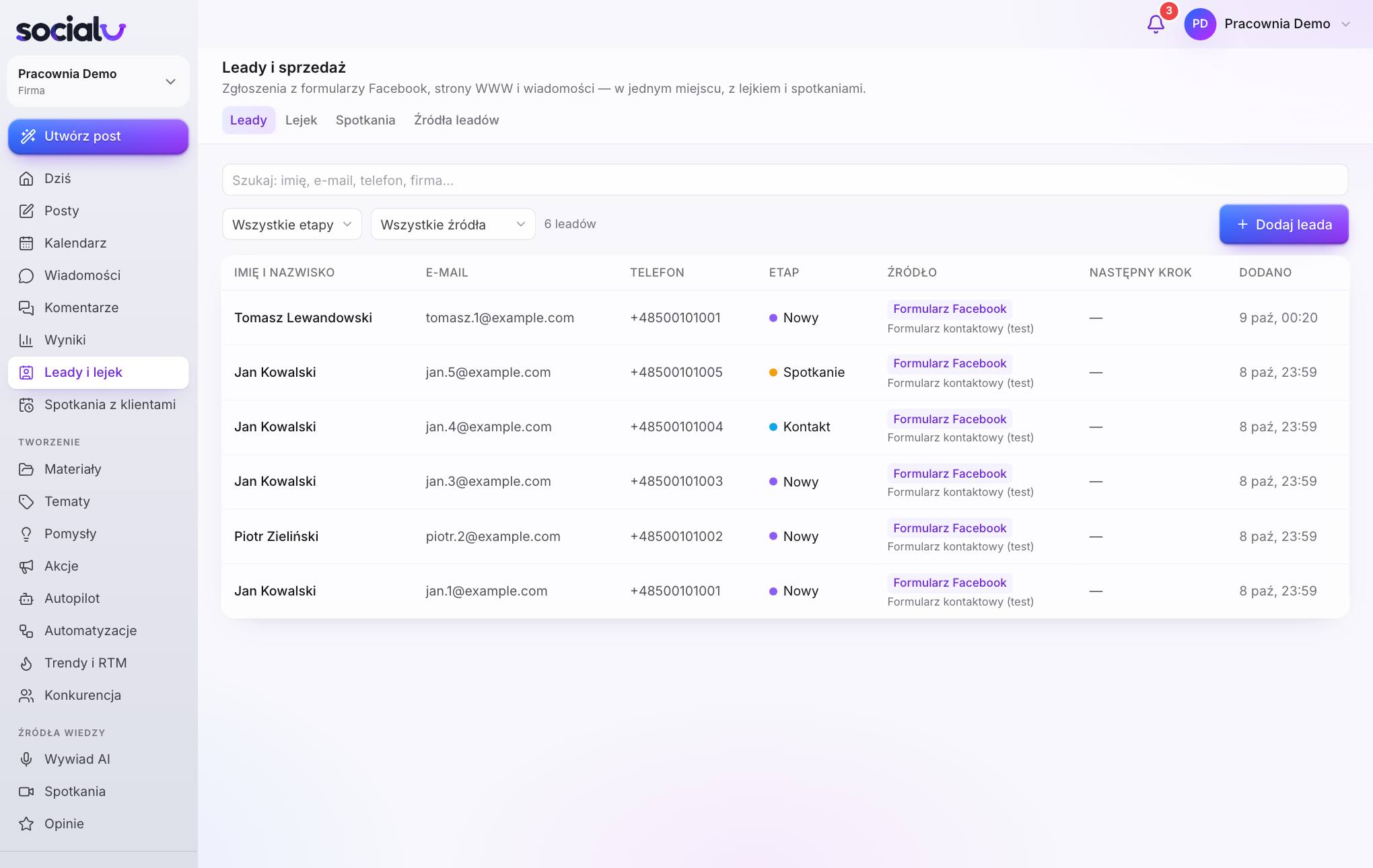
Sample data from a test account
Contacts
Works together with
Sales opportunities
A sales pipeline with stages, opportunity values, team goals and reports.
Learn moreCompanies
Customer companies with their people, opportunities, documents and agreement renewals.
Learn moreMeetings
Online booking, Google Meet, Zoom, Microsoft Teams, call scripts, presentations and recordings.
Learn moreAutomations
Blocks on a canvas: when something happens, Socialu does the rest.
Learn moreCompany mailboxes in Socialu: shared and personal, with AI and contacts.
Learn moreQuestions & answers
Contacts
Where do contacts come from?
From Meta ad forms, the form on your website, your bio page, comments, meeting bookings and chat. You can also add a contact manually or import one from a file. The source is shown next to every contact.
Can I import contacts?
Yes: from a CSV file, from other sales systems or via a webhook from another tool (e.g. Zapier or Make). Companies go to the Companies module, and people to Contacts.
Will it replace a big sales system?
It’s simple Contacts for businesses that want to keep on top of enquiries from social media, their website and ads. Larger sales teams can forward contacts with a webhook.
Can I add my own fields to a contact?
Yes. You have one field dictionary for contacts, offers and agreements: text, number, amount, date, drop-down list and more. A field can have deadlines and colours, a column on the contact list and a filter.
See also
Customers & sales
Sales opportunities
A sales pipeline with stages, opportunity values, team goals and reports.
Learn moreCalendar
Customer meetings by week, month or as a list — yours and your whole team’s.
Learn moreMeetings
Online booking, Google Meet, Zoom, Microsoft Teams, call scripts, presentations and recordings.
Learn moreOffers
Sales offers in your brand style, with a link and online acceptance.
Learn moreAgreements
Agreements and orders from an offer or your own template — signed by finger online.
Learn moreCompanies
Customer companies with their people, opportunities, documents and agreement renewals.
Learn moreProspecting
New B2B customers: a company finder, AI research and ready-made messages.
Learn moreWeb inquiries
Posts online where someone is looking for what you sell — with a draft reply.
Learn moreOnline sales
A shop, vouchers, files and deposits — payments go straight to your account.
Learn moreSales trainer
Sales call practice with an AI customer — by chat or by voice, with a score and tips.
Learn moreMore visibility. More customers. Less work.
Socialu attracts and looks after customers for you: social media, emails, text messages, conversations, Google reviews and sales in one place. Switch on the autopilot and get your time back for running your business.
Free trial, no credit card required. Cancel with one click.